Download Terere Harness
Free, and no account needed. An early access preview, so expect rough edges.
Windows
Download 0.2.0-rc.13 for Windows64-bit installer, 681 MB, released 10 Oct 2026. Windows 10 or later.
This preview build is not code-signed yet, so Windows will show “Windows protected your PC”. Choose More info, then Run anyway. To confirm the file is ours first, compare its checksum with the one below.
Check the download
In PowerShell, run Get-FileHash on the installer. The hash should be:
10a0dabdf182aa8682ae7fe5c726879d73776dadd9db161d19471d5dc5075043
Mac
Version 0.2.0-rc.13, released 10 Oct 2026. Disk images: Apple silicon (M1 and later) 674 MB. macOS 13 or later. Intel Macs aren’t supported yet. To check, open the Apple menu, then About This Mac: a Chip line means Apple silicon.
This preview build is not notarised by Apple yet, so the first time you open it macOS says it can’t check the app and offers Done or Move to Bin. Choose Done, open System Settings, then Privacy & Security, scroll down and choose Open Anyway. On macOS 13 or 14 the first message looks different and offers OK instead of Done; the rest is the same.
Or, in Terminal: xattr -dr com.apple.quarantine "/Applications/Terere Harness.app"
Mac preview builds don’t update themselves yet. Download the new version here when one is out.
Check the download
In Terminal, run shasum -a 256 on the disk image. The hash should be:
Apple silicon7997a586210097513ed33f6ebb35a0a0b00687ae2cb2623effb181710c26490e
Set up
- Run the Windows installer, or drag Terere Harness into Applications on a Mac. Install guide
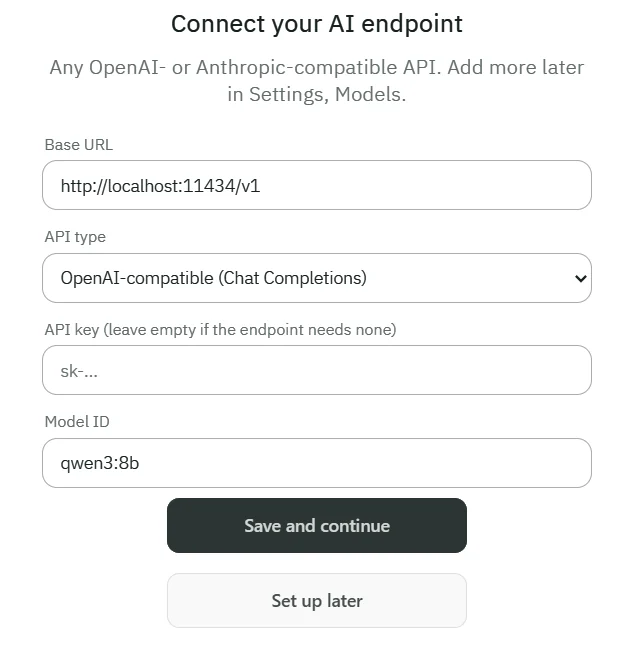
- Open Terere Harness and choose Connect a model.
- Enter your endpoint’s base URL, its API type, your API key and a model ID. Settings for common providers